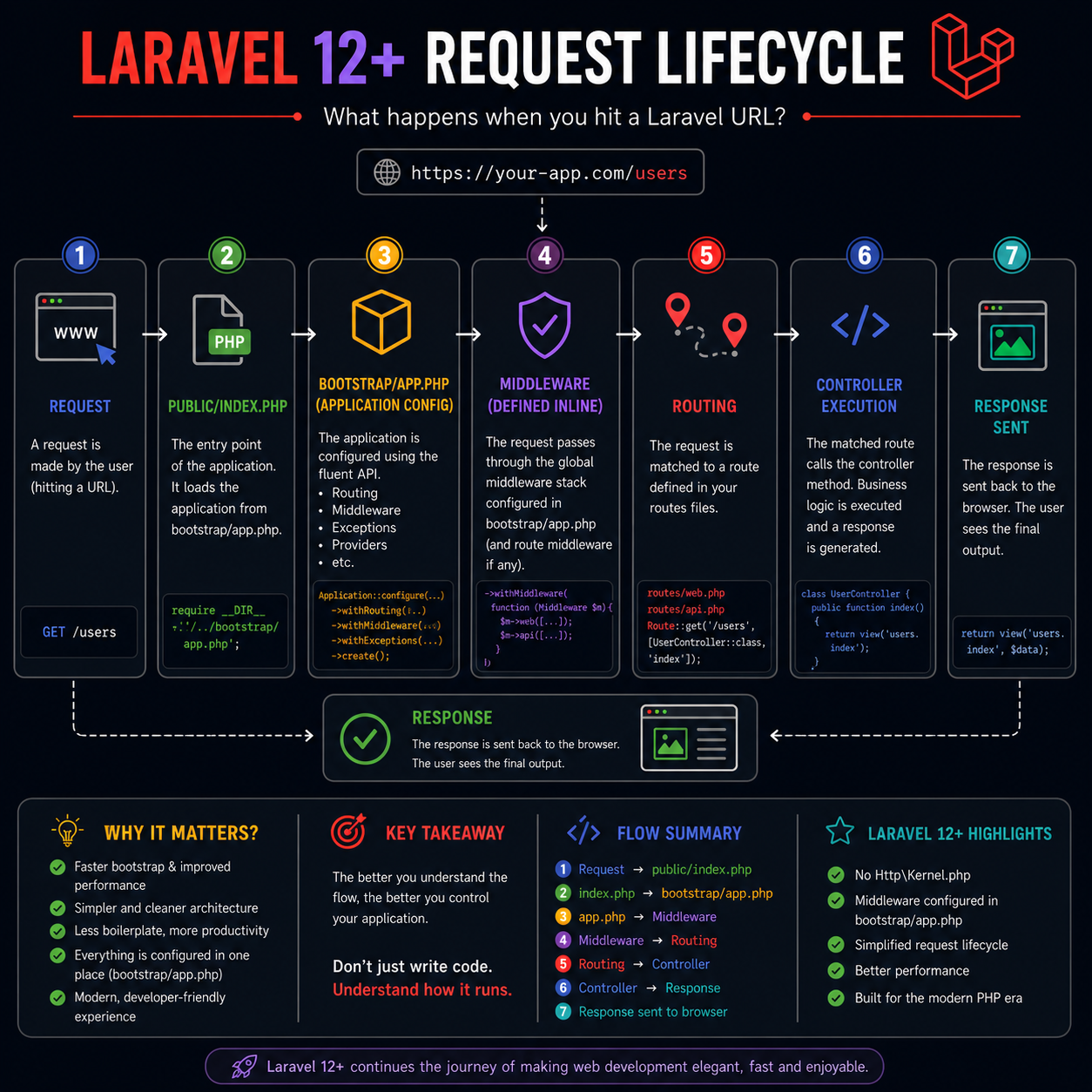
Laravel 12 Request Lifecycle Explained (Step-by-Step Guide for Beginners & Developers)
Introduction
Understanding the request lifecycle in Laravel is one of the most important concepts for any developer. Whether you're building APIs, web applications, or preparing for interviews, knowing how Laravel processes a request gives you complete control over your application.
With Laravel 11 and Laravel 12, the framework introduced a major architectural change — the removal of the traditional Http\Kernel.php. This change simplifies the entire request lifecycle and centralizes configuration in a single place:
> bootstrap/app.php
In this guide, you’ll learn the Laravel 12 request lifecycle step-by-step, including how requests are handled internally and what changed from older versions.
What is Request Lifecycle?
The request lifecycle is the journey of a request from the moment a user hits a URL until the response is returned to the browser.
Simple Flow:
Request ? Application Bootstrap ? Middleware ? Routing ? Controller ? Response
Laravel 12 Request Lifecycle (Step-by-Step)
Let’s break down each stage in detail ????
1 Request Starts (User Hits URL)
Every lifecycle begins when a user makes a request:
https://your-app.com/users
This could be:
- Opening a page
- Submitting a form
- Calling an API
Laravel receives this request through the web server (Apache/Nginx).
2 Entry Point: public/index.php
All requests enter Laravel through a single file:
public/index.php
This is called the Front Controller.
What it does:
- Loads Composer autoload
- Boots the Laravel application
- Sends the request into the framework
Example:
require __DIR__.'/../vendor/autoload.php';
$app = require_once __DIR__.'/../bootstrap/app.php';
> This file hasn’t changed much in Laravel 12.
3 Application Bootstrap: bootstrap/app.php (IMPORTANT ????)
This is the biggest change in Laravel 12.
Instead of using Http\Kernel.php, Laravel now uses a fluent configuration system inside:
bootstrap/app.php
Example:
return Application::configure(basePath: dirname(__DIR__))
->withRouting(
web: __DIR__.'/../routes/web.php',
api: __DIR__.'/../routes/api.php',
)
->withMiddleware(function ($middleware) {
// Define middleware here
})
->withExceptions(function ($exceptions) {
// Handle exceptions
})
->create();
What happens here:
- Application is initialized
- Routes are registered
- Middleware is configured
- Exceptions are handled
> This replaces:
- Http\Kernel.php
- Middleware registration
- Route bootstrapping logic
4 Middleware Execution
Middleware acts like a filter layer between request and response.
Example uses:
- Authentication
- CSRF protection
- Logging
- Request modification
In Laravel 12:
Middleware is defined inside bootstrap/app.php:
->withMiddleware(function ($middleware) {
$middleware->web([
\App\Http\Middleware\Authenticate::class,
]);
})
Flow:
Request > Middleware > Next Step
Middleware can:
- Allow request
- Modify request
- Block request
5 Routing (Matching URL)
After middleware, Laravel checks your route files:
routes/web.php
routes/api.php
Example:
Route::get('/users', [UserController::class, 'index']);
Laravel matches the request (/users) to this route.
> If no route is found ? 404 error
6 Controller Execution
Once the route is matched, Laravel calls the controller:
class UserController extends Controller
{
public function index()
{
return view('users.index');
}
}
What happens here:
- Business logic runs
- Database queries execute
- Data is prepared
7 Response Returned
Finally, Laravel sends the response back to the browser.
Response can be:
- Blade view (HTML)
- JSON (API)
- Redirect
- File download
Example:
return view('users.index', $data);
Final Flow Summary (Laravel 12)
Request
|
public/index.php
|
bootstrap/app.php (Application Config)
|
Middleware
|
Routing
|
Controller
|
Response
Key Difference: Laravel 10 vs Laravel 12
| Feature | Laravel 10 | Laravel 12 |
|---|---|---|
| Http Kernel | Present | Removed |
| Middleware Location | Kernel.php | bootstrap/app.php |
| Configuration | Distributed | Centralized |
| Complexity | Higher | Lower |
| Performance | Good | Better |
Why This Change Matters
Laravel didn’t remove Kernel just for fun — there are real benefits:
1. Cleaner Codebase
Everything is in one place (bootstrap/app.php)
2. Better Performance
Less bootstrapping overhead
3. Easier Learning Curve
Beginners don’t need to understand Kernel
4. More Control
Developers can configure everything directly
Real-World Example
Let’s say a user visits:
/dashboard
Here’s what happens:
- Request hits index.php
- App boots via bootstrap/app.php
- Middleware checks authentication
- Route /dashboard is matched
- DashboardController@index is executed
- Data is fetched
- View is returned
Common Interview Question
Q: What replaced Http Kernel in Laravel 12?
Answer:
Laravel 12 removed Http\Kernel.php and replaced it with a centralized configuration system in bootstrap/app.php, where middleware, routing, and exception handling are defined using a fluent API.
Pro Tips for Developers
- Always understand flow before coding
- Use middleware wisely (don’t overload)
- Keep routes clean and organized
- Debug using lifecycle knowledge
Conclusion
The Laravel 12 request lifecycle is simpler, faster, and more developer-friendly than ever before. By removing the traditional Kernel and introducing a centralized configuration system, Laravel makes it easier to build scalable and maintainable applications.
If you truly understand this lifecycle, you’re no longer just writing code — you’re controlling how your application behaves internally.
Comments

Thanks for the info , Very helpful for beginners like me.
Writen By JunedAhmed Created at 2026-05-01